What is WhatsApp Business API?
WhatsApp Business API is the enterprise-grade messaging platform built by Meta for businesses that need to communicate with customers at scale. Unlike the free WhatsApp Business App that most small businesses use, the API is designed for companies that need to send thousands of messages, run automated campaigns, and manage multiple agents on a single business number.
Think of it this way: the free WhatsApp Business App is like a bicycle — great for short distances, simple tasks, and getting started. The WhatsApp Business API is like a commercial vehicle fleet — built for scale, automation, reliability, and enterprise operations.
WhatsApp has over 530 million active users in India — more than any other country. The average open rate for WhatsApp messages is 98%, compared to just 20-25% for email. That's why businesses that switch to WhatsApp API consistently see 3-5x better engagement.
API vs WhatsApp Business App — Key Differences
This is the question we hear most often. Here's the definitive comparison for 2026:
| Feature | Business App (Free) | Business API (Paid) |
|---|---|---|
| Number of devices | 1–4 linked devices | ✓ Unlimited agents |
| Bulk broadcasts | Max 256 contacts | ✓ Unlimited |
| AI chatbots | ✕ Not available | ✓ Full support |
| CRM integration | ✕ Not available | ✓ Shopify, Zoho, etc. |
| Automation flows | ✕ Manual only | ✓ Full automation |
| Number ban risk | High (bulk = banned) | ✓ Zero (official API) |
| Analytics | Basic stats only | ✓ Full campaign analytics |
| Green Tick | ✕ Not available | ✓ Eligible to apply |
| Monthly cost | Free | ₹2,999 – ₹11,999/mo |
Who Needs the WhatsApp Business API?
The WhatsApp Business API is the right choice for you if any of these apply to your business:
- You receive more than 50 WhatsApp inquiries per day and can't keep up manually
- You want to send promotional broadcasts to your customer list without getting banned
- You need multiple team members to handle WhatsApp chats simultaneously
- You want AI agents to respond after hours and qualify leads automatically
- You run an e-commerce store and want cart abandonment recovery on WhatsApp
- You're a coaching centre, clinic, or service business that books appointments regularly
- You want to collect Google reviews automatically after every customer interaction
Key Features of WhatsApp Business API
Here's what you get access to when you deploy the official WhatsApp Business API through Upmark Digital:
1. Bulk Broadcast Campaigns
Send promotional messages, offers, festival greetings, and product launches to thousands of opted-in contacts simultaneously. Each recipient receives it as a personal 1-to-1 message — not a group chat. With official API, your number is never at risk of being banned.
2. AI-Powered Chatbots & Agents
Deploy GPT-powered AI agents that respond to customer queries in seconds — 24/7, in Hindi, Gujarati, or English. These aren't basic menu-driven bots. They understand natural language, follow conversation context, and can qualify leads, book appointments, and escalate to humans intelligently.
3. Multi-Agent Team Inbox
Your entire sales and support team can manage chats on a single WhatsApp business number. Conversations are automatically assigned using round-robin distribution. Supervisors can monitor all live chats. Agents can leave internal notes and see full conversation history.
Never use grey-route or unofficial WhatsApp bulk messaging tools. These use regular WhatsApp accounts and violate Meta's Terms of Service. Your number will eventually get banned — sometimes within days. The only safe way to do WhatsApp marketing at scale is through the official Business API.
4. WhatsApp Catalog & Payments
Display your entire product catalog inside WhatsApp. Customers can browse, select products and place orders without leaving the app. With WhatsApp Payments (UPI + Card), they can complete the purchase right there — reducing friction and boosting conversion rates by up to 40%.
5. CRM & E-commerce Integrations
Connect your WhatsApp API to the tools you already use — Shopify, WooCommerce, Razorpay, HubSpot, Zoho CRM, Google Sheets, JustDial, IndiaMart and 25+ more. Abandoned cart? Automatic WhatsApp reminder. New lead from JustDial? Instantly assigned to your sales team on WhatsApp.
WhatsApp API Cost in India (2026)
The cost of WhatsApp Business API in India has two components:
1. Platform Subscription Fee
This is what you pay to your WhatsApp API service provider (like Upmark Digital) for the inbox, automation tools, agent seats, and support:
- Starter Plan: ₹2,999/month — 1 number, 5,000 contacts, 2 agents, basic chatbot
- Growth Plan: ₹5,999/month — 2 numbers, 20,000 contacts, 10 agents, advanced AI
- Enterprise Plan: ₹11,999/month — unlimited everything, GPT AI agents, priority support
2. WhatsApp Message Charges (Meta's Fees)
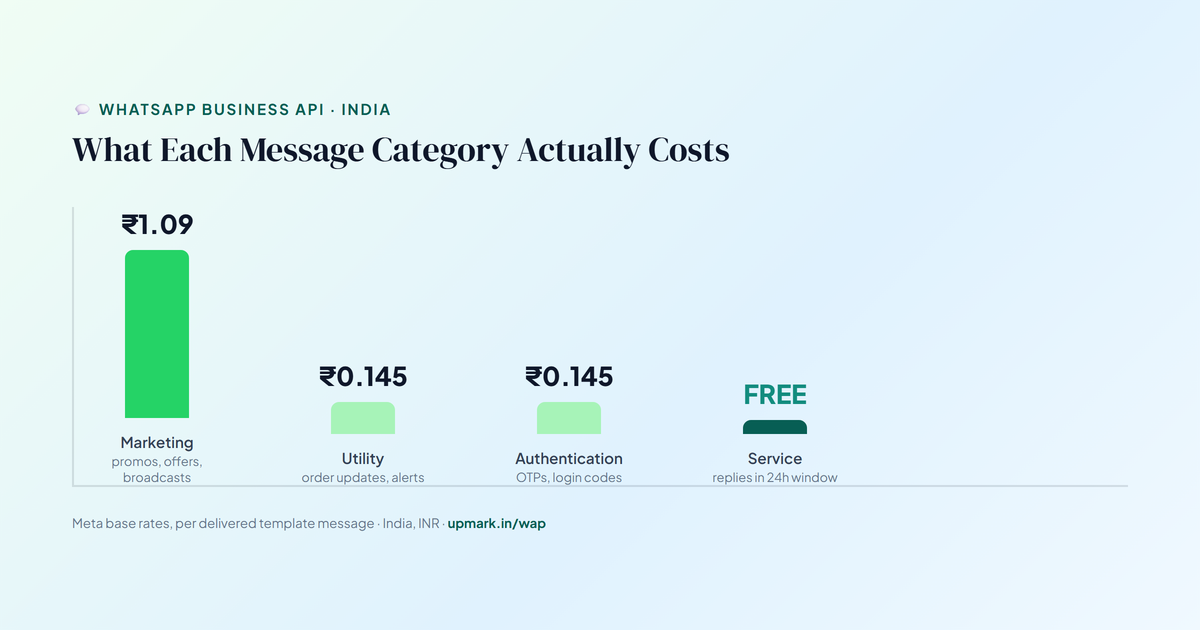
Since 1 July 2025, Meta bills per delivered template message rather than per 24-hour conversation. As of mid-2026, the India rates are:
- Marketing messages (promotions, broadcasts): ₹1.09 per message
- Utility messages (OTPs, reminders, order updates): ₹0.145 per message
- Service replies (inside a customer's 24-hour window): Free, unlimited
Broadcasting to 10,000 contacts costs: 10,000 × ₹1.09 = ₹10,900 in Meta fees alone (plus your provider's markup). Compare this to bulk SMS (₹5,000–8,000 at just 25% open rate). WhatsApp costs more per send but delivers 98% open rates and 5x more conversions. Most clients see ₹10–₹50 of revenue for every ₹1 spent on WhatsApp campaigns. For the full rate card, BSP markup breakdown, and monthly cost examples by business size, see our dedicated WhatsApp API pricing guide.
How to Set Up WhatsApp API in 5 Days
Here's the exact process we follow at Upmark Digital to get your WhatsApp Business API live:
- Day 1 — Free Consultation & Document Collection: 30-minute call to plan your setup. We collect your GST certificate, business details, and Facebook Business Manager access.
- Day 2 — Business Manager Verification: We complete your Facebook Business Manager verification and register your business with Meta.
- Day 3 — Number Registration & API Activation: Your WhatsApp number is registered with Meta's official API. Templates are created and submitted for approval.
- Day 4 — Chatbot & Inbox Setup: We configure your AI chatbot flows, set up your team inbox, integrate your CRM or e-commerce store.
- Day 5 — Team Training & Go Live: Your team gets a 1-hour onboarding session. First broadcast campaign is sent. You're live!
How to Get the WhatsApp Green Tick
The WhatsApp Green Tick (✓) is the official verified badge that appears next to your business name — similar to Instagram's blue tick. It instantly builds trust with customers.
To be eligible, your business must:
- Have an active WhatsApp Business API account (the free app doesn't qualify)
- Have a verified Facebook Business Manager account
- Be a notable business — meaning you have a significant online presence, press mentions, or a recognizable brand
- Have consistent branding — your business name on WhatsApp must match your website and Facebook page
Upmark Digital manages the entire Green Tick application process. Approval is granted directly by Meta and typically takes 1–4 weeks. We submit your application and follow up until it's approved.
Ready to Set Up Your WhatsApp API?
Get a free 30-minute demo where we show you exactly how WhatsApp API works for your specific business — live, no presentation slides, just real results.